TABLE-BASED

Authentic group-based learning starts at the table


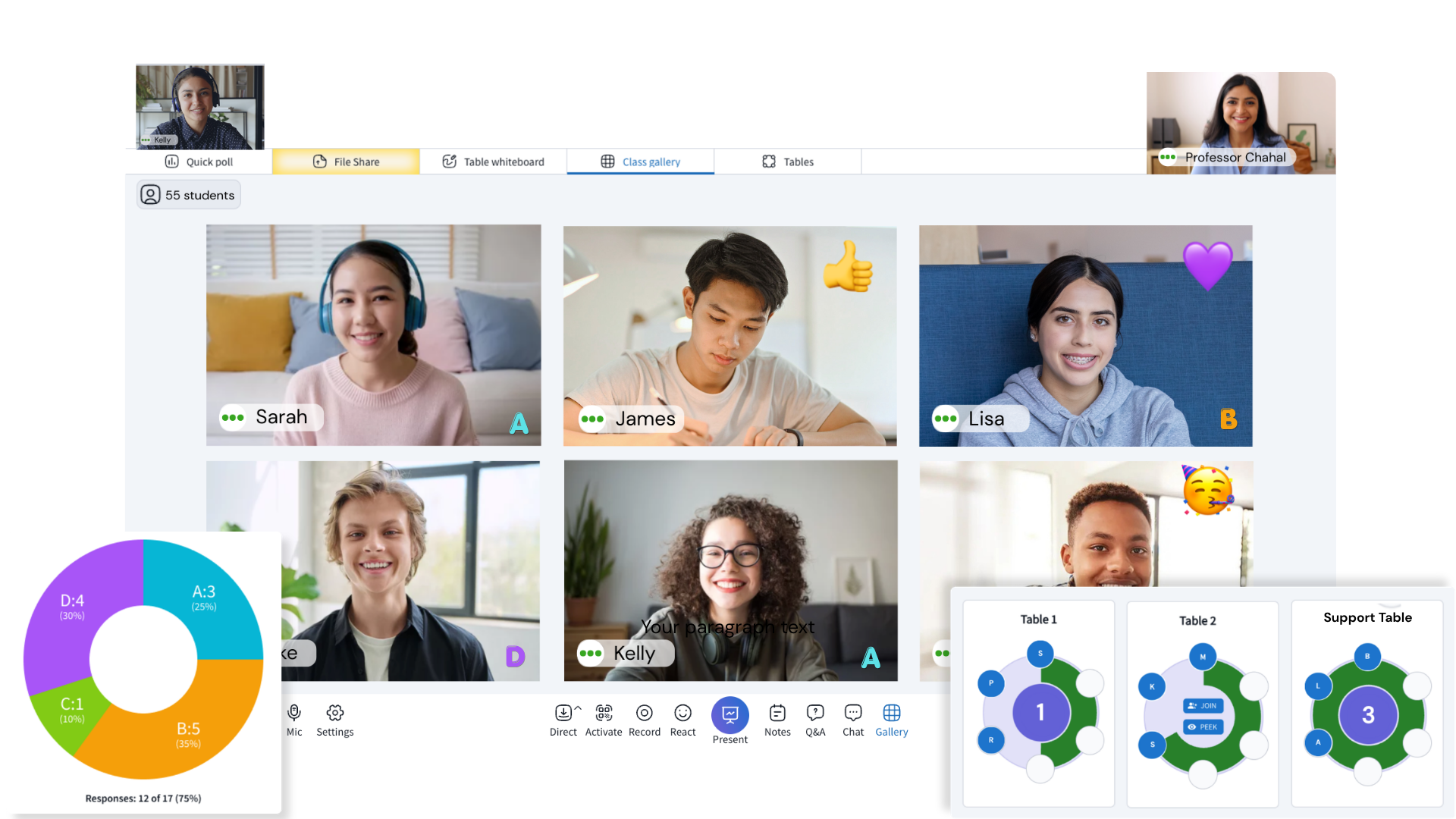
Engageli's classroom tables makes collaboration a natural part of every class by enabling peer learning, meaningful discussions, and teamwork throughout the learning experience. Instructors gain real-time insight into every group’s progress, delivering the engagement and accountability of an in-person classroom at any scale.
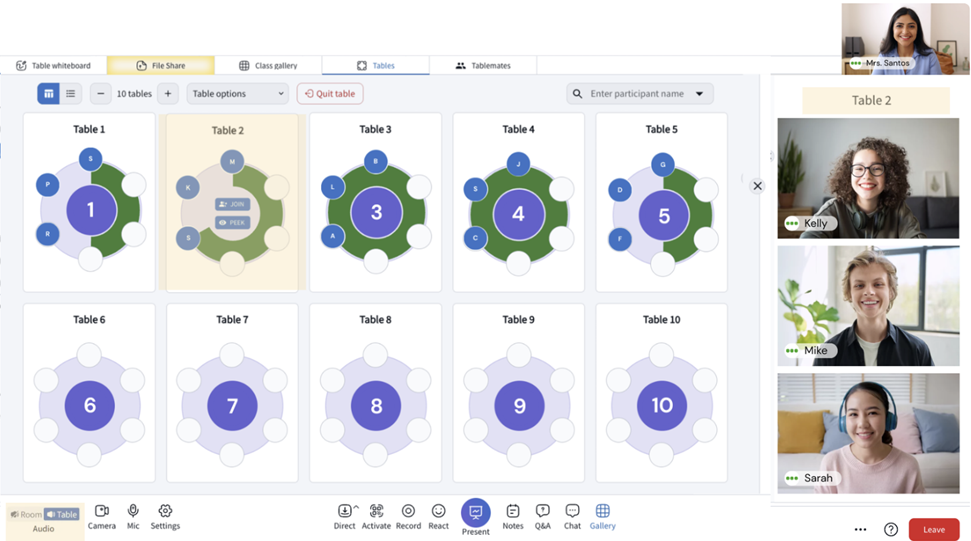
tables-Jul-11-2026-02-56-32-6711-AM
THE CATEGORY

What is group-based learning?

Group-based learning is an instructional approach where learners work together in small groups to solve problems, discuss ideas, complete projects, or practice skills. Rather than learning independently or only listening to an instructor, learners actively construct knowledge through collaboration. 


DESIGNED TO MIRROR PHYSICAL CLASSROOMS

Where every learner has a seat at the table


Engageli classroom tables eliminate breakout rooms, keeping everyone connected while enabling real-time collaboration. Instructors can seamlessly switch between classroom discussion and table collaboration using the two audio modes of room audio and table audio in the same room, instead of sending learners to isolating breakout rooms with no oversight. Engageli tables enable instructors to bring the power of small-group learning into a single, interactive virtual classroom and provide active learning strategies.

Physical classroom


Light Mode UI - Large Size (7)

Engageli virtual classroom


Light Mode UI - Large Size (6)

THE TABLE MODEL

A group that stays together, not a breakout that disappears


Breakout rooms disappear. Learning groups don’t. Engageli’s persistent tables keep learners connected with the same peers across sessions, enabling continuous collaboration without the disruption of traditional breakout rooms. Saved seating allows groups to maintain continuity from one class to the next, fostering stronger relationships and a sense of community that grows over time.
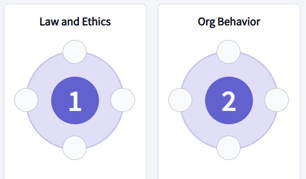
image-png-Jul-10-2026-08-29-43-1186-PM


Table names and seats


Renaming tables helps identify group purpose. Changing number of seats per table aligns the group size with the learning activity, making collaboration more effective.
random seating


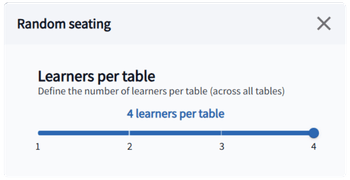
Randomized Seating


Mix learners across tables to spark new conversations and broader collaboration. Every group activity becomes an opportunity for deeper perspectives.
lock seating


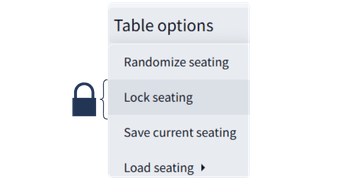
Table locks


Locking the seating arrangement ensures intentional collaboration during structured learning activities. Group work is kept focused and there are less distractions in the classroom.  
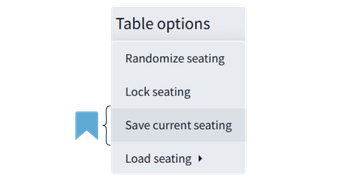
save seating


Table groups


When seating arrangements are saved, learners can return to the same groups, allowing trust, communication, and teamwork to develop over multiple sessions. 
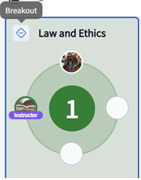
image-png-Jul-10-2026-08-42-33-9420-PM


Breakout tables


Create quiet tables for focused thinking and reflection. This allows teachers to support neurodiverse learning styles and reduce classroom noise fatigue. 
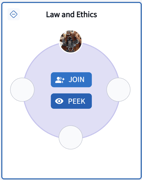
image-png-Jul-10-2026-08-44-35-8671-PM


Instructor Peek


Listen in on table conversations without interrupting the flow of learning by peeking in tables. Join table discussions to answer questions and clarify concepts. 

THE DIFFERENCE

Breakout rooms create temporary groups. Engageli creates learning communities.

Dimension
Group-based learning in Engageli
Group work in a video conferencing tool

Group persistence

Group-based learning in Engageli
✓ True collaboration
Learners collaborate in persistent tables throughout the class
Group work in a video conferencing tool
✕ Not persistent
Groups are created temporarily through breakout rooms

Classroom structure

Group-based learning in Engageli
✓ Single classroom
Tables are an integrated part of the classroom experience
Group work in a video conferencing tool
✕ Separate rooms
Breakout rooms are separate from the main classroom experience

Learning experience

Group-based learning in Engageli
✓ Connected

Collaboration is embedded into the entire learning journey

Group work in a video conferencing tool
✕ Fragmented
Group discussions are isolated moments

Instructor oversight

Group-based learning in Engageli
✓ Continuous monitoring
Instructors can monitor and support every table in real time
Group work in a video conferencing tool
✕ Limited monitoring
Instructors have limited visibility once groups leave the main room

Engagement data

Group-based learning in Engageli
✓ Participation

Speak time is tracked during group discussion and ava

Group work in a video conferencing tool
✕ Not designed

Analytics data for group participation is not available


TOOL CONSOLIDATION

Group-based learning shouldn't take separate tools


Many virtual learning environments rely on a patchwork of tools: one for video, another for whiteboarding, a separate polling app, a discussion platform, and an overarching LMS to tie everything together. Every transition between tools interrupts the learning flow, increases complexity, and fragments valuable engagement data.


Engageli virtual classroom consolidates the fragmented tools. Live instruction, persistent learning tables, table whiteboards, table documents, and engagement analytics all work together seamlessly. Because every interaction happens within the classroom, learner participation, collaboration, and progress are captured in a unified record, giving instructors a unified view of engagement while creating a more connected learning experience for every learner.
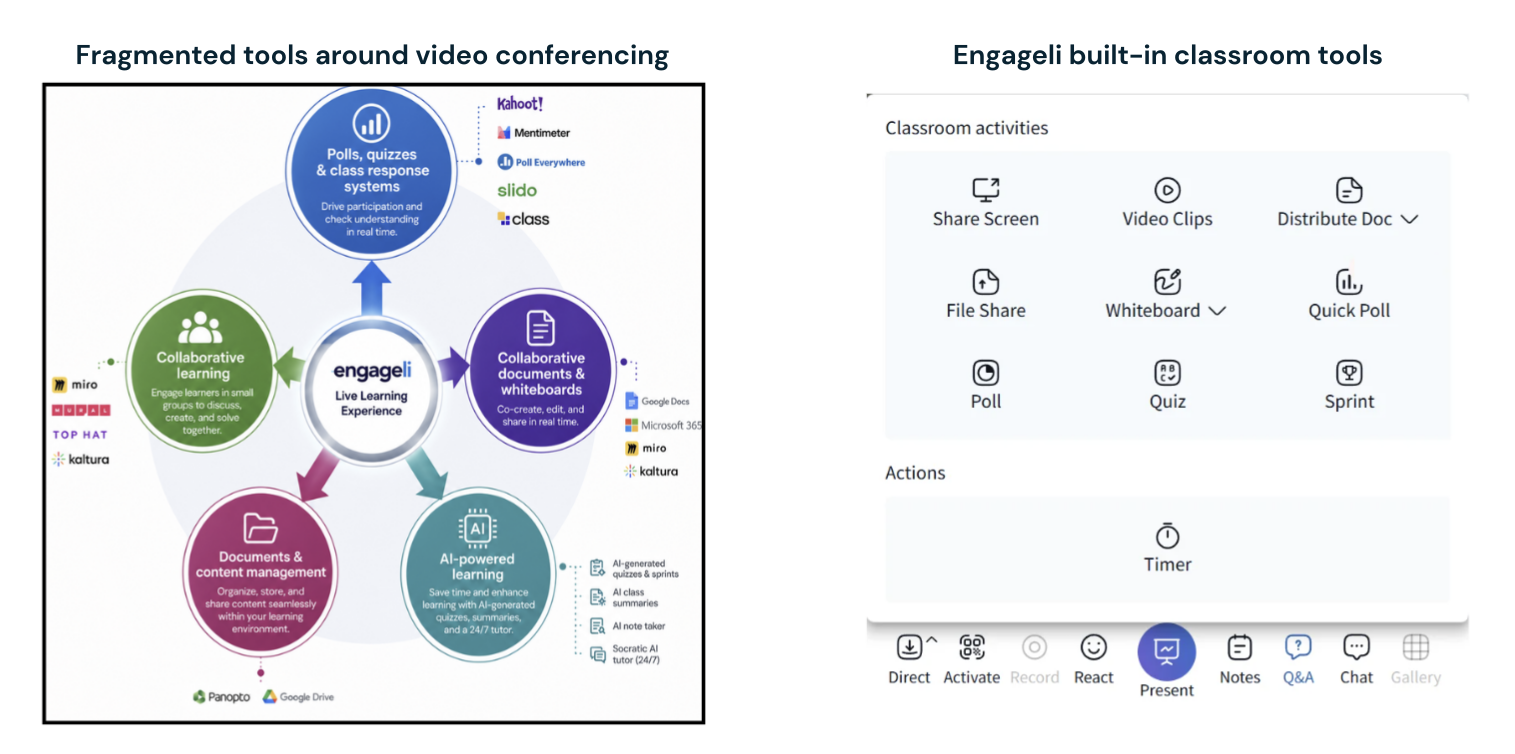
 

Fragmented tools around video conferencing


Teach every table, not just the whole class

Peer-to-peer learning

Small-group collaboration at tables enables students to explain concepts, share perspectives, and solve problems together, reinforcing understanding while building communication and collaboration skills.

Guided practice

Instructors introduce concepts and guide students through practice activities at their tables, providing feedback and coaching as they walk the classroom and visit tables. This delivery strategy reinforces learning through exploration and practice.

Think-pair-share

Learners sit at tables in pairs, reflect individually, discuss ideas with their tablemates, and then share insights with the larger class. This delivery strategy enforces critical thinking and moves learners from individual reflection to collaborative discussion.

Role-play

Learners participate in scenario-based exercises at their tables such as case studies, negotiations, or professional role-play. This strategy strengthens applied skills and experiential learning and allows practice of real-world scenarios in a safe environment.

Learning support

Real-time learning support occurs since instructors can quickly identify disengaged learners through engagement indicators and talk to them at a breakout table to provide in-the-moment coaching.

Focused class time

Breakout tables create a cone of silence that offers quiet spaces within the virtual classroom. This environment allows learners to focus and receive individualized support from staff without interruption from the broader classroom conversation.
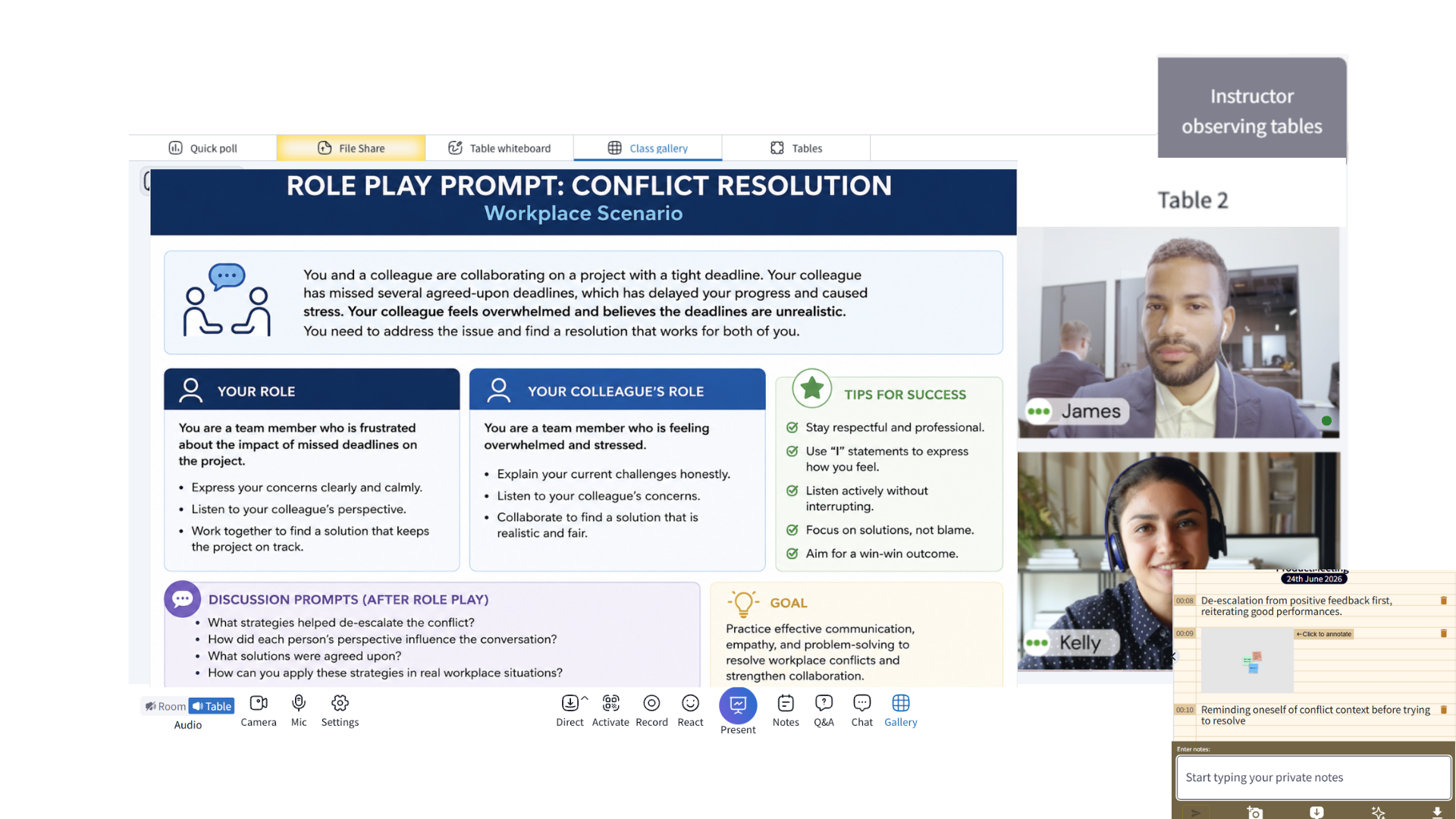
Guided Role-Play

Practice Real-World Skills

Role Play-1


1

Preparing for the Role Play

Encourage learners to clarify any uncertainties about the activity. Consider running a brief practice exercise using the Podium and Panel to familiarize learners with the format and reduce anxiety. Share the prompt on screen to provide context for the role-play.


Use table randomization of 2-3 learners per table to create groups, then lock the seating arrangement. Switch to table audio and set a classroom timer for 10 minutes to keep each role-play round on track.

2

Facilitating the Activity

Learners should be nudged to turn cameras on and self select roles from the shared prompt. Encourage learners to use the Notes feature to record personal strengths, observations, and areas for improvement during the role-play.


At the conclusion of each round, learners should exchange constructive feedback and reflect on their performance at their table. Sitting in small groups to openly share what went well and what didn't is a powerful way to build trust and a positive team culture.
3

Monitoring and Debrief

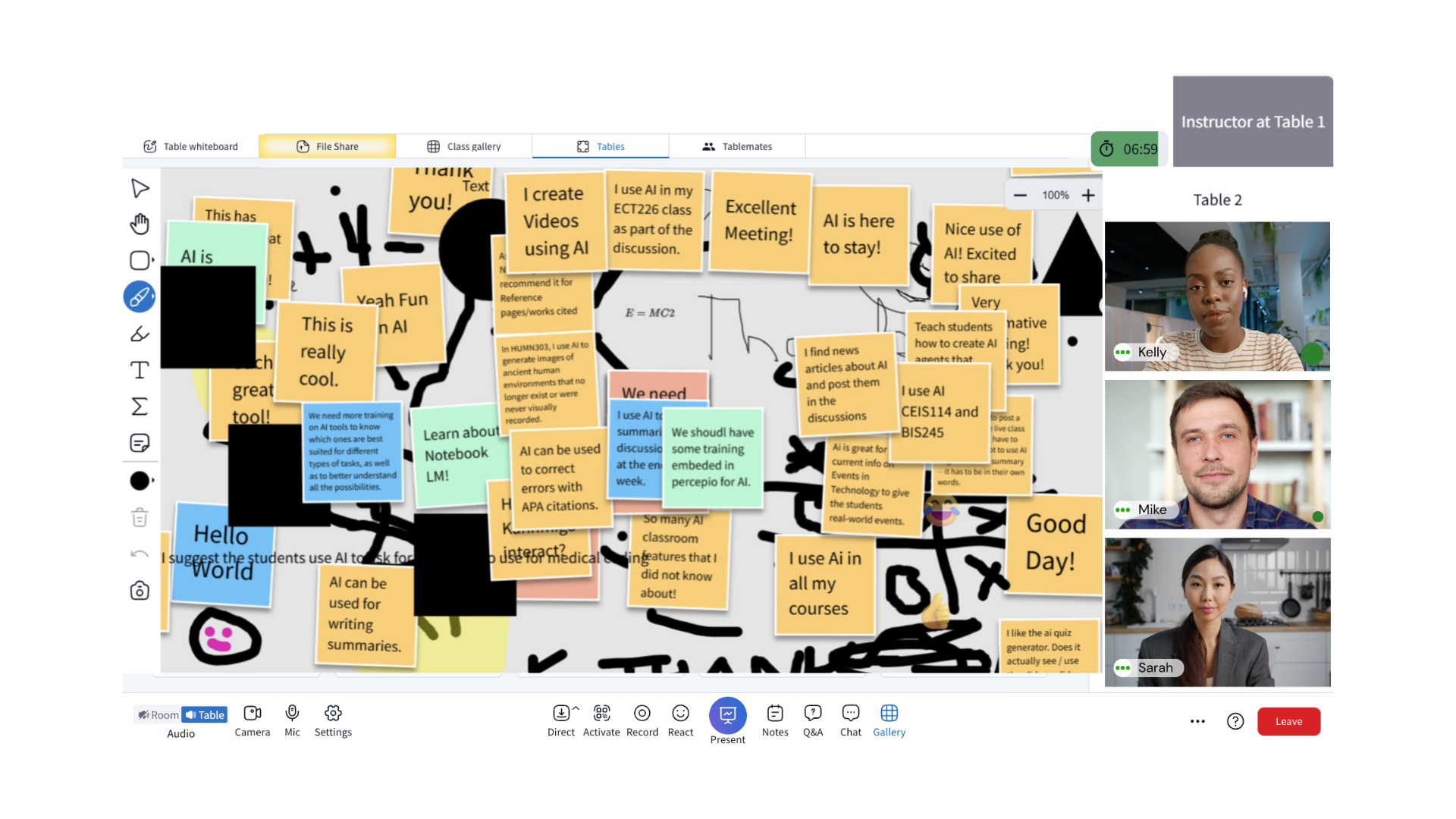
Throughout the activity, instructors can monitor progress from the podium using the table engagement indicators. Instructors can peek into table discussions without disrupting the flow or join tables directly to provide guidance and answer questions,. If the same groups will be used again, save the seating arrangement for future role-play exercises or culminating activities.
 
After all rounds are complete, bring the class together to share key takeaways. Use polls to prompt reflection on questions. 
Peer Conversations
PEER-TO-PEER LEARNING

Peer Conversations, Deeper Understanding

1

Activity Introduction

Explain the peer-to-peer activity and share key concepts, resources, and a problem statement for the entire class. 

Use table randomization or manually assign learners to tables of 3–4 learners. Move the room to table audio and start a timer to pace the activity.
2

Knowledge Exchange

Challenge each table to create a solution, recommendation, or explanation. Learners should collectively prepare a brief presentation that demonstrates their understanding and represents different perspectives.
Learners can capture ideas on a shared table whiteboard and take their own notes during the learning process.
3

Share Out and Cross-Learning

Move the class to room audio. Invite a group leader from each table to raise their hand and share key insights from their discussion. Use the podium while the rest of the class asks questions or contribute additional perspectives.
Encourage learners to compare approaches and identify common themes. Allow the class to provide applause using sound reactions at the end of each group share-out.
Learner Support
PERSONALIZED SUPPORT

Keeping Learners on Track

1

Quick Knowledge Check

Launch a low-stakes quiz or sprint related to the lesson. View real-time responses in the class gallery to confirm which learners may need additional support.
Shift from instructor-led instruction to collaborative learning by engaging learners in a table-based activity centered on a shared prompt.
2

Coaching Intervention

Invite identified learners to a dedicated support and coaching table. Ask diagnostic questions of what part of the concept is unclear to identify exact learning gaps.
Meet learners where they are at by providing targeted explanations, examples, or guided practice.
3

Personalized Reinforcement

Ask learners to then apply the concept at the table. Learners receive immediate and private support from the instructor to address misconceptions before they compound.
Instructors can proactively re-engage learners rather than waiting for poor assessment results to reveal gaps.

Ready to see Engageli tables in action?

Speak to our team of educators to see how Engageli's virtual classroom increases collaboration while giving instructors real-time visibility into engagement.

Got questions? We’ve got answers.

Group-based learning is an instructional model where learners work in small, structured groups rather than as isolated individuals in a large class. The goal is deeper engagement through peer discussion, collaborative problem-solving, and shared accountability,  not just splitting up a class.

Most online platforms make this hard. Breakout rooms require assigning learners in, monitoring them without being able to see them, and pulling them back out. Engageli's virtual tables work differently: learners are always seated at a table of 3–5 peers from the moment class starts. Instructors switch between room audio (address everyone) and table audio (groups work independently) without moving anyone in or out.
Five benefits, with the data to back them:

1. Deeper engagement. Engageli's research shows that active learning, which includes structured group work, produces 54% higher test scores than passive lecture delivery of the same content.

2. Peer-to-peer teaching. Explaining a concept to a peer reinforces it more effectively than hearing it from an instructor. Small groups create the space for that exchange.

3. Stronger critical thinking. Groups of 3–5 force learners to defend their reasoning and consider alternatives — the foundation of 21st-century analytical skills.

4. Communication and collaboration skills. These transfer directly to workplace performance, which is why corporate L&D programs increasingly build around small-group formats.

5. No 'back of the room' anonymity. In a 100-person Zoom call, a quiet learner disappears. At a table of four, they don't.
Three honest challenges, and what Engageli does about each:

1. Uneven participation. In an unmanaged group, one person dominates and others coast. Engageli's Peek feature lets the instructor silently observe any table's audio and activity without interrupting. Combined with engagement analytics per learner per table, it makes free-riding visible.

2. Logistics of grouping. Assigning learners to groups mid-class usually kills momentum. Engageli supports three fast grouping methods: random assignment (drag a slider to set size, one click), poll-based grouping (learners are auto-seated by their poll response), and preset arrangements saved from previous classes.

3. Loss of instructor visibility. Traditional breakout rooms are a black box; instructors can't see groups without joining and disrupting them. Engageli instructors stay in the main room, Peek into any table, and move between tables as fluidly as walking across a physical classroom.
Four examples that work well in Engageli's table structure:

1. Think-pair-share. Pose a question to the full class, give 60 seconds for individual reflection, switch to table audio so pairs or small groups discuss, then switch back to room audio to surface insights.

2. Case-study discussion. Assign a collaborative document (Google Doc, Microsoft 365) to each table. Groups annotate and work through the case together. The instructor Peeks into tables to check progress and join the group that needs help most.

3. Role-play scenarios. Tables run negotiation simulations, customer conversations, or peer feedback exercises. Each table can work on a different scenario simultaneously.

4. Skill-level-matched practice. Run a quick poll ('How familiar are you with [topic]?') and Engageli auto-seats learners into tables based on their answers. Beginners get scaffolded content; advanced learners get stretch problems.
Five strategies that hold up in virtual classrooms:

1. Keep groups persistent across sessions. Trust and norms develop over multiple meetings. Save a table arrangement as a preset and reuse it.

2. Assign collaborative documents per table. A shared doc gives each group a tangible focal point, not just a conversation, but an artifact they build together.

3. Name the tables. Project names, book characters, course topics, named tables build group identity faster than 'Table 3.'

4. Rotate between room audio and table audio deliberately. Each transition signals a shift in activity mode and keeps the session from feeling flat.

5. Walk the room. Drop into different tables during activities, the same way you would move between desks in a physical classroom. Presence changes behavior, even brief, silent visits.
Group-based learning is a broad umbrella. The most established methods under it are:

• Cooperative learning — structured group work with individual accountability (Johnson & Johnson model).
• Collaborative learning: learners construct understanding together through shared inquiry.
• Team-based learning (TBL):   persistent teams work through readiness assurance tests and application exercises.
• Problem-based learning (PBL):  groups tackle open-ended problems and develop solutions.
• Peer instruction:  learners answer a concept question individually, discuss with peers, then answer again.

All five rely on small, stable groups, which is exactly what Engageli's tables provide out of the box. The specific method is a choice made by the instructor; the platform doesn't force you into one.
The hard part of online group learning has always been the logistics, breakout rooms require assigning learners, monitoring them without being able to see them, and pulling them back out. Engageli's approach removes that overhead.

Learners are seated at tables of 3–5 when they join the class. They can see and hear their tablemates and interact with shared tools at their table. When the instructor uses room audio, everyone hears the instructor; when they switch to table audio, tables work independently while staying in the same virtual room. No moving anyone in or out.

The instructor can join any table (learners see and hear them), Peek at any table (silent observation), or stay at the podium to address the whole class. Collaborative documents, whiteboards, and chat all work per-table. The result is small-group collaboration without the friction of breakout rooms.
A structured workflow that works in Engageli:

1. Set the prompt. Post the discussion question in the main chat or assign a shared document to each table so groups have a focal point.

2. Switch to table audio. This signals groups to work independently. Everyone stays in the same virtual room, no one is sent anywhere.

3. Monitor with Peek. Check progress on each table silently. Join the table that needs help most; leave the others alone.

4. Signal transitions. Return to room audio when time's up. Each group reports a key insight back to the full class.

5. Surface patterns. Highlight common themes across tables and address misunderstandings that appeared in multiple groups. The debrief turns table-level discussion into class-level learning.
Research in active learning consistently points to groups of 3–5 as the sweet spot. Smaller groups risk being dominated by one voice; larger groups let quiet learners disengage.

Engageli tables default to this range and give instructors full control: during random seating, a simple slider sets the number of learners per table. For sessions that benefit from even smaller groups, peer instruction, one-on-one role plays, you can set it to pairs. For methods that need more diverse input, you can expand to six or seven.

Whatever size you choose, it stays consistent across the session, so the group dynamic has time to develop rather than resetting every activity.
The mechanics, step by step, as they happen in an Engageli session:

1. Learners join. They're auto-seated at tables, randomly, by poll response, or by a preset from a previous class.

2. The instructor opens on the podium in room audio. Everyone can hear; learners can see their tablemates.

3. For a group activity, the instructor switches the classroom to table audio. Each table now hears only its own members. Shared docs or whiteboards assigned per table open automatically.

4. The instructor 'walks the room' by joining a table to participate, peeking to observe, or moving to the next table. Learners at other tables continue without interruption.

5. For debrief, the instructor switches back to room audio. Tables report out; the class discusses insights together.

All of this happens in one virtual room. No links. No reassignment. No waiting for learners to come back.
Four practices that separate good facilitators from the ones whose groups quietly fall apart:

1. Establish norms early. In the first session with a new group, spend five minutes on how you expect tables to run. who speaks, how decisions get made, what happens if someone falls behind. Groups that set norms stay productive.

2. Rotate visits deliberately. Don't visit the same table every week. Cycle through tables so every group gets time with the instructor.

3. Use collaborative docs as anchors. A shared doc per table gives you something concrete to check in on, you can see whether the group is actually working together or splintering.

4. Surface group outputs. Tables that know their work will be shared with the class take it more seriously. Make the debrief a real moment, not a formality.
Five criteria that separate platforms actually designed for group learning from video conferencing tools with a breakout-room feature bolted on:

1. Persistent small-group architecture. Learners should be at a group from the moment they arrive, not assigned into a separate room mid-class and pulled back out.

2. Instructor visibility into groups. Can you see what each group is doing without disrupting their work? If not, you've lost half of what makes group work effective.

3. Per-group collaborative tools. Each group needs its own shared document, whiteboard, and chat - not a single class-wide tool.

4. Flexible grouping. Random assignment, poll-based grouping, and saveable presets. Mid-class re-grouping should take seconds, not minutes.

5. Engagement data per group, not just per learner. If you can't see which groups are struggling, you can't intervene where it matters most.
Three principles that shape how groups actually perform:

1. Match composition to the task. Mixed-skill groups work best for peer teaching and cooperative learning. Homogeneous skill-level groups work best for targeted practice where learners need to work at their pace. Engageli's poll-based grouping makes it easy to re-seat by response mid-class , beginners together, advanced together, discussion questions appropriate to each.

2. Make re-grouping painless. Groups should be able to shift within a session when the task changes. In Engageli, a new random seating or poll split takes one action and doesn't move anyone out of the room.

3. Build group identity. Persistent membership across sessions, named tables, and shared collaborative documents all contribute to a sense that 'this is my group.' Groups that identify as groups outperform groups that are just 'the four people who happened to be seated here.'